Keychron K2 HE vs Q1 HE
Research-based guide. How we choose keyboards
Disclosure: some links are affiliate links. We may earn a commission at no extra cost to you. How this works.
Start here
The shortlist
- Check price
Keychron K2 HE
Hall Effect without going full custom 75%
- Check price
Keychron Q1 HE
Work + games, one aluminum board 75%
Compare current prices, available switches and shipping at the store. Some links earn us a commission at no extra cost to you.
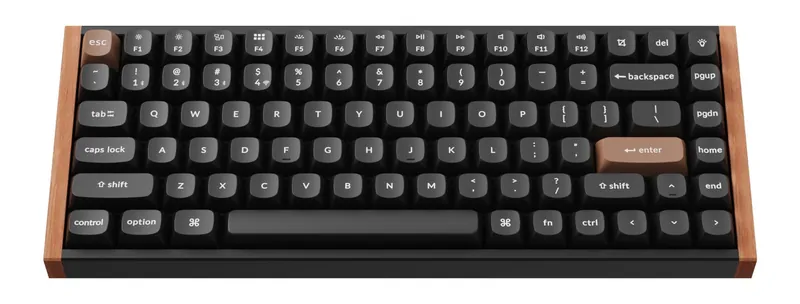
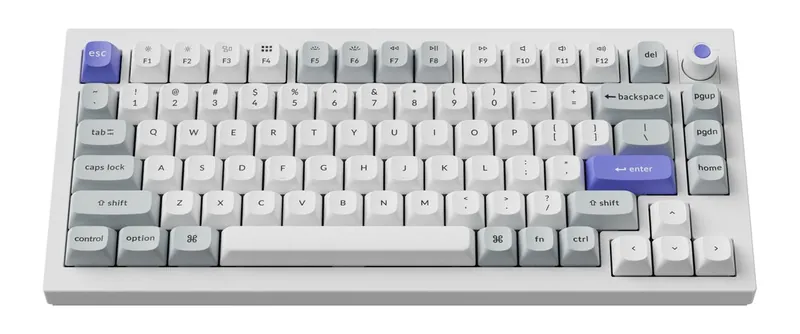
Both of these are Keychron 75% magnetic keyboards. Both do rapid trigger. Both talk to Mac and Windows. The fight is not “which sensor is real Hall Effect.” The fight is what you are paying for around the sensor.
Short version:
- K2 HE — plastic, wireless workhorse, the sales volume 75%.
- Q1 HE — aluminum gasket case, QMK-first custom, the desk object.
If you want rapid trigger and you are not sure, buy the K2 HE. If you already know you hate plastic cases, buy the Q1 HE and stop reading comparison charts.
Who each one is for
K2 HE is for you if you want Hall Effect, 75%, and wireless without a custom-keyboard hobby. You would have bought a K2 / K2 Pro / K2 Max in any other year.
Q1 HE is for you if the keyboard stays on one desk, you like weight, and you want QMK remapping that does not feel like a gaming overlay.
Neither is for you if you need a number pad, you want tactile bumps, or you do not care about rapid trigger — get a K2 Max or a budget gasket 75% instead.
Spec split
| K2 HE | Q1 HE | |
|---|---|---|
| Layout | 75% | 75% |
| Case | Plastic | CNC aluminum |
| Mount | Typical K-series (not a custom gasket kit) | Gasket |
| Switches | Keychron magnetic / Hall Effect | Keychron magnetic / Hall Effect |
| Rapid trigger | Yes | Yes |
| Firmware story | Keychron + HE software | QMK + HE |
| Wireless | 2.4 GHz + Bluetooth + wired | Wireless Q1 HE models (confirm the listing) |
| What you pay extra for | — | Metal, mount, “custom” feel |
Always open the product page and check wireless vs wired and ANSI vs ISO. Keychron splits those into separate listings.
Typing and games — same family, different body
For games, both can do adjustable actuation and rapid trigger. You will not win a round because the case is aluminum. You might enjoy the Q1 more because it does not slide around and the sound is less hollow.
For typing, the Q1 HE’s gasket mount is the reason people upgrade. The K2 HE types like a good wireless 75%: fine, a bit more “board-shaped,” perfectly usable for a workday.
If your job is words and your hobby is FPS, Q1 HE is the one-board answer. If your job is words and FPS is a couple evenings, K2 HE is the sane spend.
The usual mistakes
- Buying Q1 HE for the sensor alone. You already get the sensor on the K2 HE.
- Buying K2 HE expecting a custom aluminum kit. It is a K2 with magnets.
- Ignoring Mac modifiers. Both can work; set the layout in software on day one.
- Chasing 8K polling on a Bluetooth connection. Use the 2.4 GHz dongle or a cable when you care.
Which link to click
Need rapid trigger on an everyday wireless 75% → Keychron K2 HE
One keyboard on a permanent desk, aluminum case → Keychron Q1 HE
Still torn: if you have ever searched “gasket mount” or “Q1 vs K2” in the past, you already want the Q1. If you have not, take the K2 HE.
For other layouts and configurations, browse Keychron’s keyboard range.
Check the manufacturer details
Confirm the exact model, switch compatibility, price and availability before buying. These product pages are reference links, not hands-on test reports.
Back to the shortlist